Understand Exchange/Outlook OST Files Completely
Offline Storage Table files, or OST for short, are created in Outlook when it synchronizes with an Exchange server. Offline work is stored in OST files, and as soon as the server is securely connected, all of the saved emails will begin updating with the appropriate client right away. In other words, you can work offline and the server is automatically synchronized because of OST files. The production of OST files turns out to be the ideal process in several situations where the network is restricted. The ability to create offline OST files allows users to continue working during service outages.
How do OST files operate?
When working in offline mode, Microsoft Outlook generates an identical replica of the user mailbox on Exchange Server, which is referred to as an offline folder with an OST file extension. OST files are precise copies of each user’s Exchange folders. When you are connected to Exchange Server, all changes made while working offline are automatically synchronized. You can duplicate the modifications made while working offline and carry out transmit and receive operations using the send/receive command.
How Can I Make an OST File?
To generate an OST file, adhere to the following guidelines:
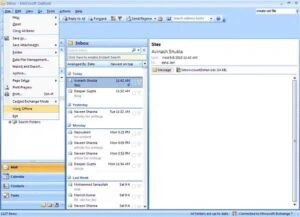
- Choose the work offline mode option by clicking on the file menu.
- All the information from the Exchange server is automatically transferred to the newly formed offline storage table file on your machine.
- Choose which mailbox folders to use offline. Typically, offline access is automatically enabled for the Inbox, Outbox, Deleted Items, Sent Items, Calendar, Contacts, and Task folders. To choose any other folder, adhere to the following guidelines:
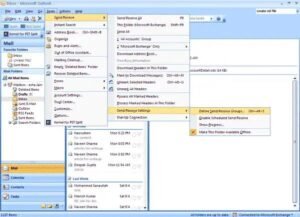
- Select Send/Receive > Send/Receive Settings > Define Send/Receive Groups from the Tools menu.
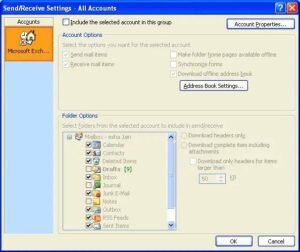
- Select the Send/Receive group that includes the Exchange account from the list, then select Edit.
- Choose your Exchange account under Accounts.
- Choose the folders you wish to utilize offline from the Folders option.
Benefits of OST File Utilization
When users must work offline—that is, without a secure connection—OST files are frequently utilized. The best way to protect their work is to create an OST file. The dread of losing your work because of OST files, regardless of server exchange connectivity
The OST file acts as a backup of your prior, crucial emails in the event of an unintentional mailbox deletion or corrupted mailbox data. User OST convert in PST Format at any moment.

