Resolve “Outlook Data File PST Usage is Disabled on this Computer” Error
Are you encounter “Outlook Data File PST Usage Is Disabled on This Computer” error in Outlook ?This issue can disruptive ,especially when you depend on Outlook .
Today Many user using Outlook for its powerful features and performance .However some user encounter “Outlook Data File PST Usage Is Disabled on This Computer” error which disrupt your workflow and negatively impact your email communication experience.
In this blog we explore all possible reason behind “Outlook Data Files (.pst) Usage Is Disabled on This Computer” error and discuss about manual and automated method to resolve issue quickly.
Why you face Outlook data file PST usage is disabled error?
Below are some common reason why “Outlook Data File (PST) usage is disabled” error occurs.”
- When Outlook running safe mode restict access to PST file
- PST file usage restricted due to configured Outlook group Policy settings
- If PST file become corrupt, Outlook fail to open or access it
- Outlook conflict with third -party add-ins ,limit access to PST file
- Some time Antivirus or firewall unexpectedly block PST file access
Manual method to resolve “Outlook data file (PST) usage is disabled on this computer” error
Multiple free methods can help you for troubleshoot “Outlook data file (.pst) usage is disabled on this computer” error without losing important emails and attachment
Method 1: Utilize Registry Editor
This issue occur after making change in Registry Editor. Resolve it, that Registry editor setting are correctly configure to enable PST file usage on Computer
Step 1: Press Windows + R to Open Run Dialog box
Step 2:Type regedit in search bar and press Enter
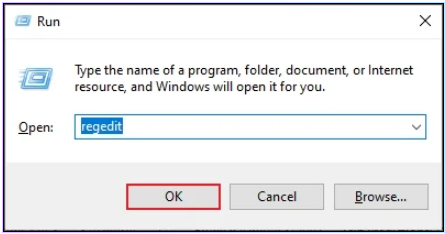
Step3: Go to HKEY_CURRENT_USER\Software\Policies\Microsoft\Office16\Outlook\PST
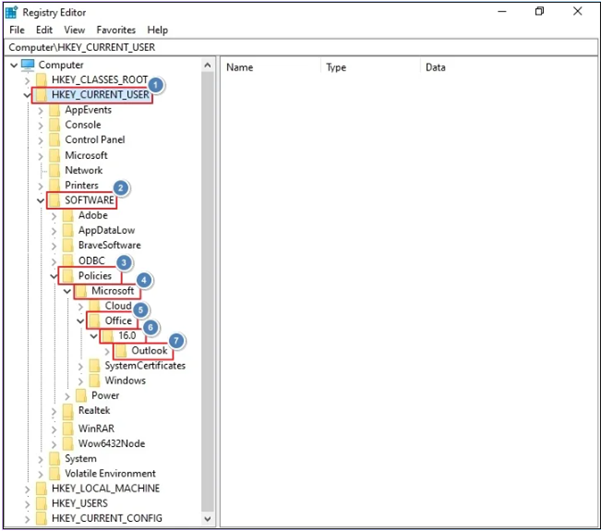
Step 4: Create a new DWORD value and name PSTDisableGrow.
Step 5: Double -click PSTDisableGrow and set 0 Value
Step 6: Save change ,navigate to HKEY_CURRENT_USER\Software\Policies\Microsoft\Office\16.0\Outlook and create new DWORD value name DisablePST
Step 7:Set DisablePST value to 0 and save the change.
Points to Remember:
- When value is set 0, user permits to add new data and PST files by default.
- 1 Value restricts add new content to exist PST file and block create new PST file.
- When set 2, Registry value only exclusive PST data ,such as SharePoint PST files
Method 2: turn off unused Outlook add-ins
Incompatible , unnecessary ,or faulty add-ins pop up error “Outlook data file PST usage is disabled.” Disable all add -ins and check error resolved or not
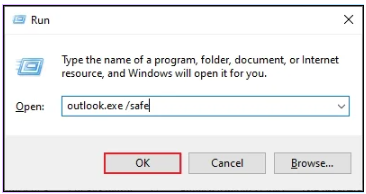
Step1: Close Outlook and Run dialog box
Step2:In Run dialog box, type outlook.exe/safe and click OK.
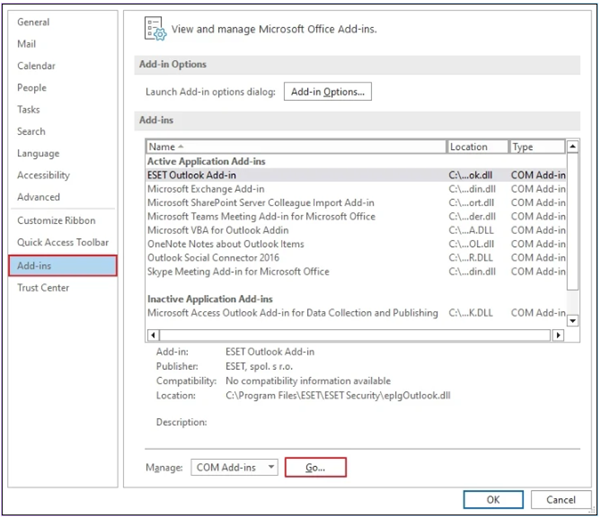
Step3:Click File ,then select Options.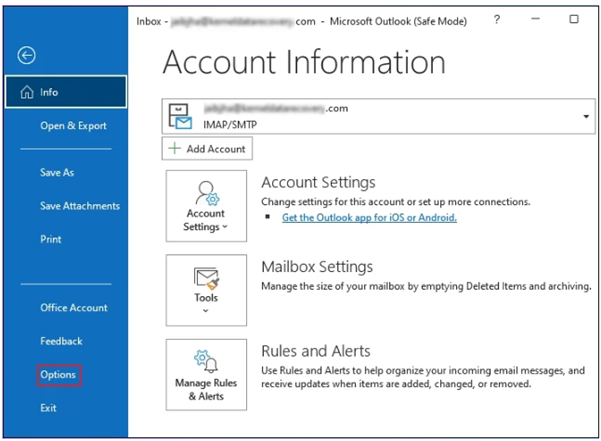
Step 4:Go to Ads-ins section, then click next to manage
Step5:In COM Add -ins windows ,uncheck unnesaary add-ins ,click OK
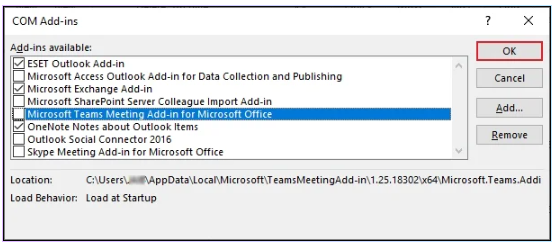
Step 6. Restart Outlook and check “Outlook data file PST usage is disabled on this computer” resolve
Method 3:Reduce Outlook Mailbox Size
This error occur due to oversized Outlook mailbox. Issue Fix by reduce PST file size.
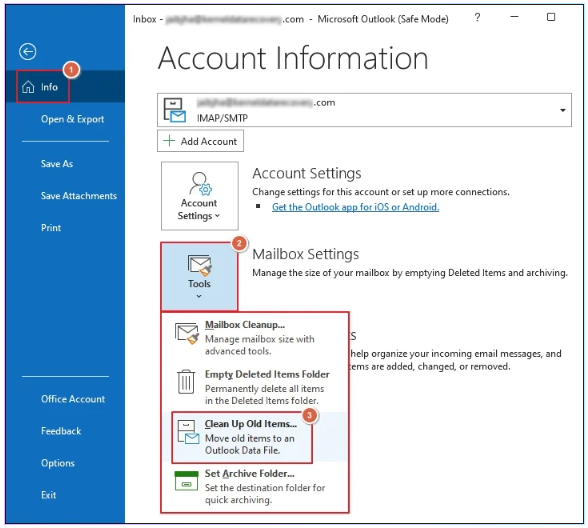
Step1:Open Outlook ,navigate to File>Info>Tool and click Clean Up Old items
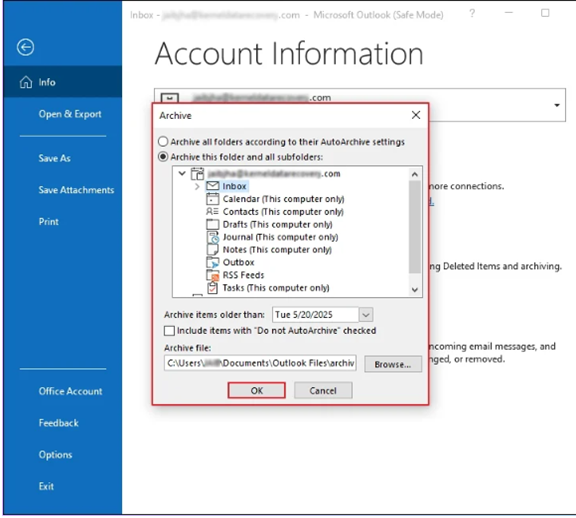
Step2:In Archive Wizard, select a folder ,choose location to save archived file and click OK to reduce mailbox size.
Method 4: Update Outlook
An Outdated Outlook version can block PST file usage .Update Outlook to latest version to fix problem
Step 1: Open Outlook and click on File>Office Account.
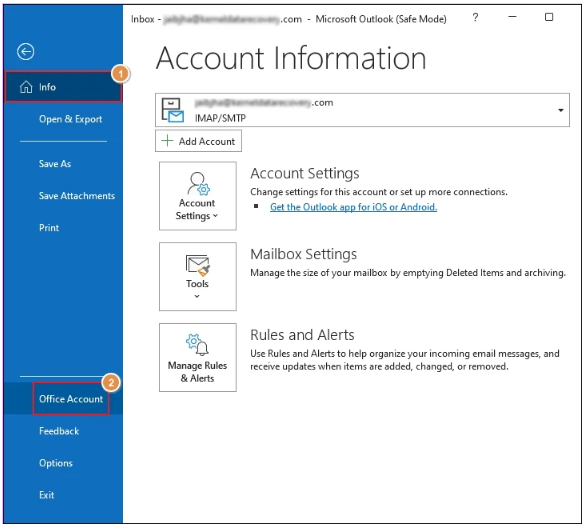
Step2:Go to Update Options and Update Now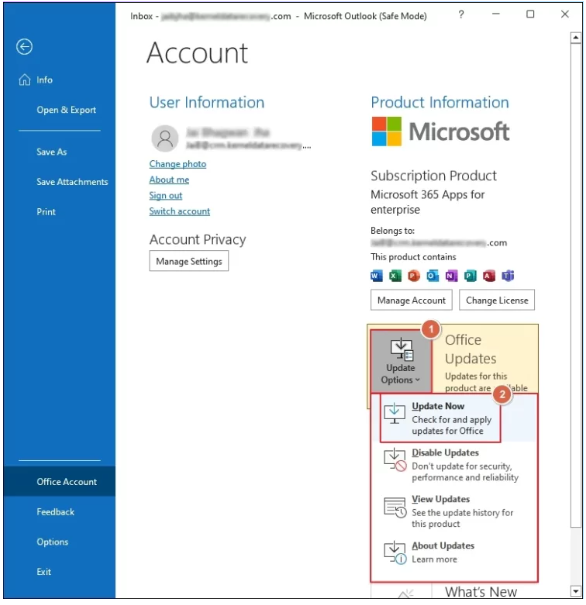
After complete Outlook update ,restart application to to access latest features
Method 5:Resolve Outlook Profile issue
If your profile become corrupt ,you may encounter error “Outlook data file (.pst) usage is disabled on this computer. ” Repairing Outlook profile for remove corruption and can resolve issue
Method 6:Resolve Outlook PST File Corruption
When PST file become corrupted ,Outlook display this error. To resolve issue by repair corrupted PST file using ScanPST,exe .Follow below steps
Step1:Fist close Outlook .Next run SCANPST.EXE and click Browse .
Step2: click start button to begin repair process
Step3:Tool scan PST file to detcted error and inconsistencies.
Step4: Click Repair to begin resolve all detected error
Step5:after repair process completed ,restart Outlook
ScanPST ,exe can not repair severe corrupted PST file or file larger than 2GB
Best Soluation for Instant Repair Corrupted PST files
Goldytools Outlook PST Repair Tool is designed to repair severely corrupted PST file without data lose . it can easily fix corruption PST file .You can easily preview PST email with their attachment before recovery
Top Advanced Feature of Outlook PST Repair Tool
- Fix broken ,inacessible ,damage and corrupted PST file
- Repair large and bulk PST file without limitation
- Multiple output save option including PST,MSG,EML,HTML,MHT,PDF and more
- Use various filters to selective save data from PST file
- Trial version fix and save 25 items per folder for free
Conclusion
Facing the “Outlook Data File PST Usage is Disabled on this Computer” error cab disrupted worked flow .You can use manual methods to effectively resolve issue If you follow then you carry certain risks .To minimize data lose and safely repair corrupted PST to use Trusted Goldytools Outlook PST Repair Tool.

