Resolve Outlook Address Book Error 0x80190194
In summary, an error number 0x80190194 stops users from downloading or synchronising the offline address book when they attempt to download it manually. Orphaned OST files and invalid security (SSL) certificates are two of the main causes of this problem. You need to either erase the contents of the OAB folder, rename the Outlook folder, or create a new Outlook profile in order to resolve this problem. See our guide for more specific instructions. Additionally, we are talking about a trustworthy tool called GoldyTools OST to PST Converter, how to correct this mistake, and any kind of OST file damage.
The Global Address list is stored on the Exchange Server, whereas Outlook maintains OAB files. All of the organization’s Outlook users’ names, email addresses, phone numbers, and other contact details are included in an OAB file. Exchange Server loading is lessened when Outlook users perform an address query or search for an address. OAB files are typically created once every eight to twenty-four hours.
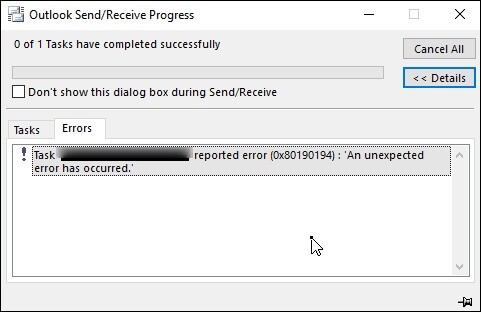
However, users may get the message “Task ’email’ reported error (0x80190194):” while attempting to manually download the OAB files. The message “An expected error has occurred” appeared on their displays. We have investigated, examined, and compiled the most effective methods to quickly resolve this frequent OAB error. We recommend that you go through our guide in its entirety, paying close attention to every step, as well as the reasons listed for prevention.
Why does the error code 0x80190194 exist?
The fundamental causes of error 0x80190194 are as follows.
- Invalid SSL certificate.
- Improperly set OAB URL.
- OST file corruption.
- Malware or virus attack
- Corrupt Outlook profiles.
Simple fixes for counter error 0x80190194.
After going over the basics of the issue 0x80190194, it’s time to repair it using our simple methods. Read on for more information.
1. Create a new Outlook profile.
The 0x80190194 problem might be caused by a damaged or corrupted Outlook profile. Thus, we must now establish a new profile. Follow the instructions outlined below.
Close Outlook and open Control Panel.
Go to User Accounts > Mail > Show Profiles > Add.
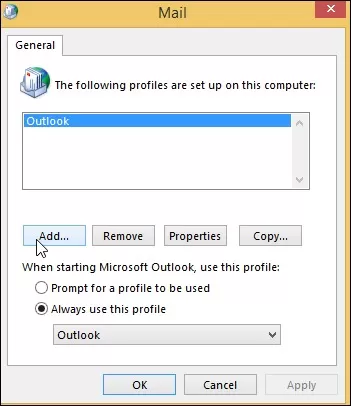
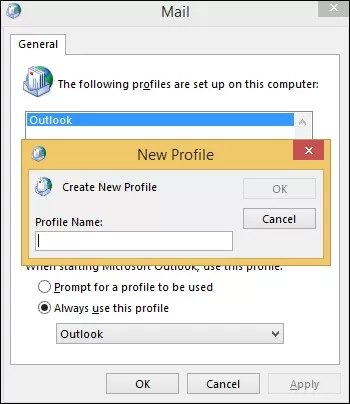
Enter a new profile name and click OK.
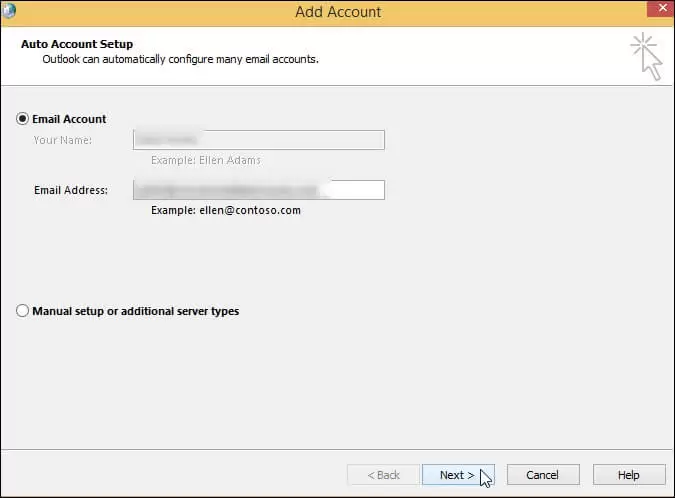
Follow the prompts to add your email account. Tap Next.
Now click Finish.
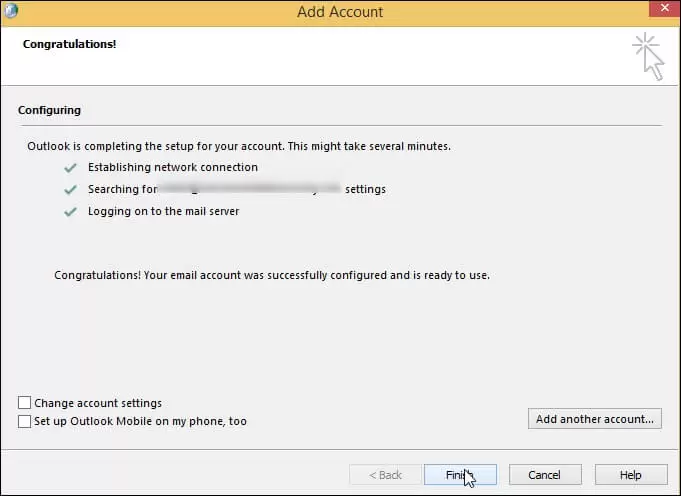
Set your new profile as the default or select the option ‘Prompt for a profile to be used’.
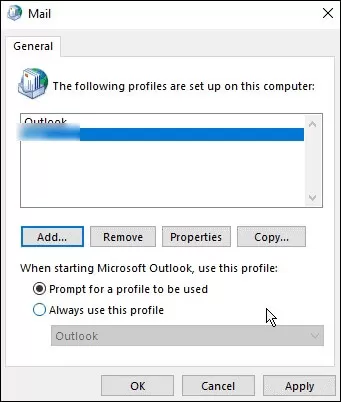
Hit OK to end the Mail dialogue box.
2. Clearing the contents of the OAB.
For those still receiving the 0x80190194 problem, use the steps below to delete the Offline Address Book data files and resolve the issue immediately.
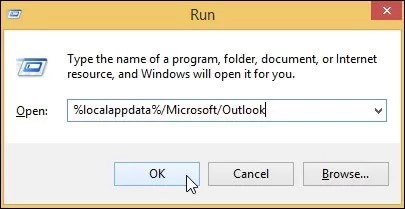
Open the Run window and enter “%localappdata%/Microsoft/Outlook”.
Select all of the files in the Offline Address Book folder.
Right-click and choose Delete.
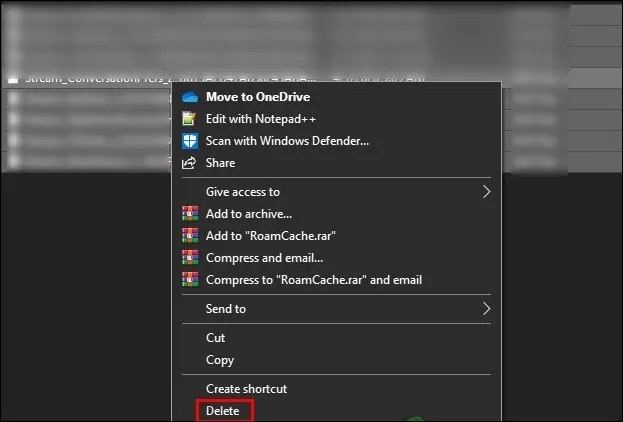
Restart your PC and check for the error.
3.Rename Outlook folder.
Renaming an existing Outlook folder causes the program to generate a new folder. You will not lose any data because chats and attachments are already backed up in the cloud, however this will help you resolve the issue 0x80190194. Here’s what to do.
- Open the Run window and type in “%localappdata%”.
- Look for the folder Microsoft.
- Search for the Outlook folder, then right-click and select Rename.
Change the name to “Outlook.old”. Press Enter.
Note: To avoid OST file damage, your operating system will disregard this folder and generate a new one from scratch if you add the “.old” extension.
Try downloading the OAB file right now. If the issue continues or no OST file is recreated, your profile can be corrupted or deleted from the server. The OST becomes unavailable and orphaned if this occurs.
However, OST to PST converter software may be used to convert OST files to PST. There are several aspects of this tool:
- OST files may be converted to a number of other formats, including PST, PDF, MSG, EML, RTF, TXT, HTML, and DOC.
- Transfers OST files to various IMAP servers, Office 365, Live Exchange, and Gmail.
- Allows for the large-scale conversion of big OST files.
- Offers a preview option for in-depth material browsing.
- Even encrypted OST files may be recovered and converted.
- Enables items in OST files that have been irrevocably erased to be recovered.
Get the trial version now for comprehensive details and practical experience.
In conclusion
You can make a new profile, remove the OAB content, or rename the Outlook folder in order to combat an Outlook Address Book Update Error 0x80190194. We hope that troubleshooting this problem will be simple for you. OST file corruption has to be corrected if all other methods are unsuccessful. Try our suggested automatic way to quickly and error-free get your Outlook up and running.

